SamVNC
Turn any desktop into a browser-accessible remote desktop. X11/GDI screen capture, keyboard & mouse input injection, Chrome CDP automation. Native system tray on Windows, macOS and Linux — launch, configure and take screenshots right from the tray; zero config, instant HTTPS remote address, no public IP needed.
Why SamVNC
Built on aitun.cc tunnel — no public IP required. Get a public HTTPS address on startup and control desktop and Chrome from any browser; all packages are published on GitHub Releases.
Install SamVNC
One-line install on Linux / macOS; on Windows click the button below to get the installer — unzip and run. All packages are available as direct downloads from the samai.cc mirror, and are also published on GitHub Releases.
From the samai.cc mirror · samvnc-windows-amd64.zip (server + tray + aitun client bundled) · also on GitHub Releases
- Unzip and run
samvnc-tray-windows-amd64.exe— it lives in the system tray - Tray menu → Settings: empty key = free proxy-address mode (auto aitun.cc URL); set an aitun key = permanent subdomain
- Tray menu → Settings: leave the key empty for free proxy-address mode, or fill in your aitun key for a permanent subdomain. The access token is generated automatically on first run — one click “Regenerate” in Settings rotates it
Remote Desktop in 30 Seconds
Four steps after install — from launch to screenshots, everything happens in the system tray. No terminal, no curl.
1️⃣ Launch the Tray

Run samvnc-tray (on Windows, double-click the tray exe from the zip) — the SamVNC icon appears in your menu bar / system tray and the server starts automatically. Native trays on Windows, macOS and Linux, one unified icon.
2️⃣ Configure from the Tray
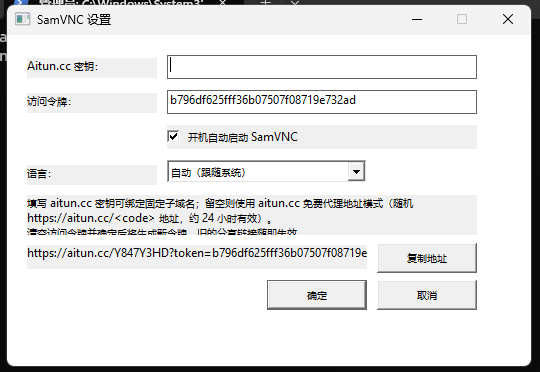
Tray menu → Settings: leave the Aitun.cc key empty for the free proxy-address mode (an https://aitun.cc/<code> URL, ~24h) or enter your key for a permanent subdomain. The access token is generated automatically on first run — the “Regenerate” button in Settings rotates it anytime (old share links stop working). Switch between English / 中文 anytime, enable auto-start on boot. On macOS the first Settings open asks once for the "control System Events" permission (used to bring the dialog to the front so its text fields accept typing) — approve it once and you are done.
3️⃣ Copy Address, Open in Browser
Tray menu → Copy Address: copies the full URL with the access token in one click — paste it into any browser and your remote desktop is right there. No public IP, no client, no configuration. Tokens are auto-generated on all three platforms (mac / linux / windows) with identical behavior.
4️⃣ Screenshot from the Tray
Tray menu → Screenshot: the current desktop is saved as a timestamped PNG (in your Pictures/SamVNC folder) and opened automatically. Replaces the old curl /api/screenshot workflow — one click, screenshot in hand. On macOS, allow Screen Recording once when prompted. Programmatic clients can still call the same API.
Download from GitHub Releases
All packages and binaries are available as direct downloads from the samai.cc mirror (samai.cc/samvnc/downloads), and are also published on GitHub Releases. Click the links below to get the latest version.
| Platform | Architecture | Package | Download |
|---|---|---|---|
| Windows (recommended) | x86-64 (amd64) | samvnc-windows-amd64.zipServer + system tray + aitun tunnel client, unzip and run |
Release page |
| Linux | amd64 / arm64 / armv7 | samvnc-server-linux-*Statically linked single binary, or use the one-line install above |
Release page |
| macOS | Intel / Apple Silicon | samvnc-server-darwin-*Statically linked single binary, or use the one-line install above |
Release page |